When it comes to businesses-to-business relationships, the global impact of the Internet has unlocked quite a few doors. Rather than developing relationships with exclusively businesses in their region, it’s not uncommon for a small manufacturer of model airplanes in Iowa to use the web to find the vendor that can meet all of their needs, even if they’re located in Austria. Doing business internationally means there may be an occasion where you’ll need to communicate in another language. Fortunately, for Windows 10 users, it has never been easier to switch your computer or mobile device’s language.
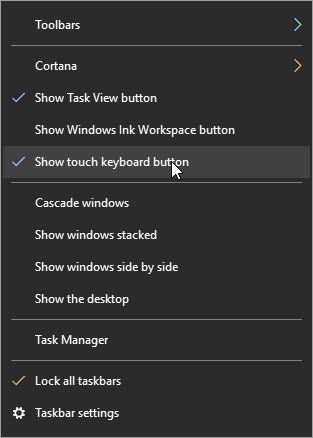
First, hover over the taskbar and right-click. Select show touch keyboard button.
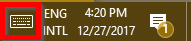
You’ll now see a keyboard icon next to your clock and calendar on the right-hand size of your taskbar.
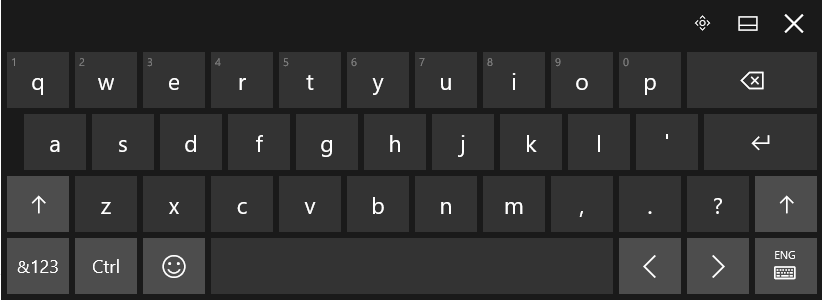
This will bring up a touch keyboard. In the case that you don’t have a touch screen, you can also click on the buttons with your mouse.
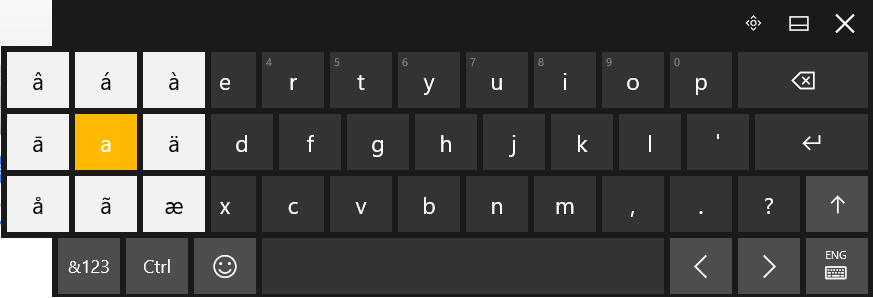
Click and hold the base letter to see all the possible accents for that letter. Click the one that you would like to insert.
For those who are going to be writing in another language on a regular basis. It’s possible to change the entire layout of your keyboard. Your chosen language can be found to the right of the touch keyboard icon.
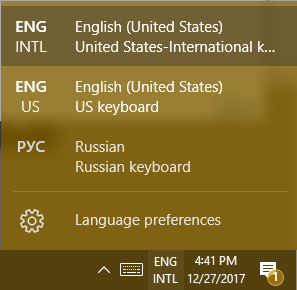
This doesn’t just apply to the touch keyboard. It applies to your physical one, as well.
Hint: If you don’t see the language you’re looking for in the list of available languages, you can add and edit your list by selecting Language preferences.
Using Another Version of Windows?
For those of you who are using Windows 7 or 8.1 (or even Vista or XP), in addition to seriously thinking about upgrading your operating system, you can still use ALT Codes. A numeric list of codes is assigned to the accented letter or symbol in question. While pressing down the ALT key, type the four-digit code on the numeric keypad at the right edge of the keyboard.
Do you have any tips or tricks that use you like use when communicating in another language? Tell us below! Comentario a continuación! Commentaires ci-dessous! Комментарий ниже!




Comments